Written in 2022 and tested with Ubuntu 20.04, Kubespray v2.18.1, and Kubernetes v1.22.5. For newer deployments, align Kubespray, Ubuntu LTS, and Kubernetes versions accordingly.
This guide walks through setting up a High Availability (HA) Kubernetes cluster on Ubuntu 20.04 VMs or bare-metal servers using Kubespray and Ansible.
Prerequisites & Node Topology
- 3 VMs for Kubernetes Control Plane / Master Nodes (Ubuntu 20.04)
- 3 VMs for Kubernetes Worker Nodes (Ubuntu 20.04)
- 1 VM for the Kubernetes Installer / Ansible Control Node (Ubuntu 20.04)
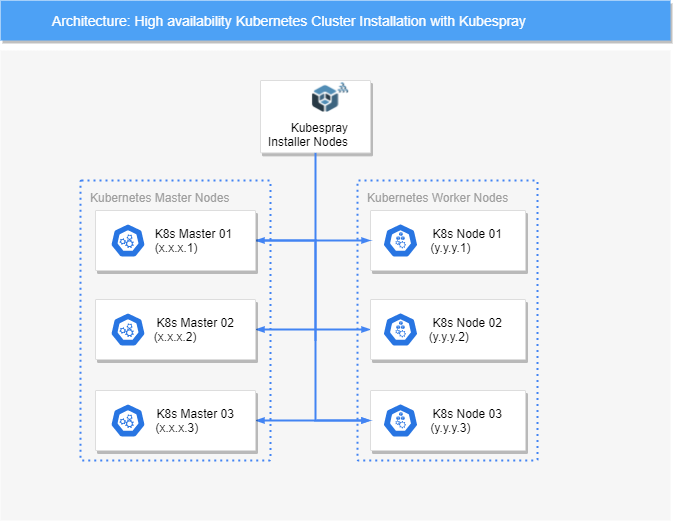
Example node layout:
K8s-Master-01(x.x.x.1— Ubuntu 20.04)K8s-Master-02(x.x.x.2— Ubuntu 20.04)K8s-Master-03(x.x.x.3— Ubuntu 20.04)K8s-Worker-01(y.y.y.1— Ubuntu 20.04)K8s-Worker-02(y.y.y.2— Ubuntu 20.04)K8s-Worker-03(y.y.y.3— Ubuntu 20.04)
1. About Kubespray
This quickstart helps you install a Kubernetes cluster on bare metal, vSphere, OpenStack, AWS, GCP, Azure, or Oracle Cloud using Kubespray.
Kubespray combines Ansible playbooks, inventory tooling, and production defaults for cluster lifecycle management. It provides:
- A highly available control plane and etcd quorum
- Composable attributes for CNI, proxy mode, and container runtime
- Support for popular Linux distributions (Ubuntu, RHEL/CentOS/Oracle Linux, Debian, Fedora, openSUSE, Flatcar)
- Continuous integration test coverage
2. Standard Linux OS Settings
Complete the baseline Linux preparation on every node first:
Standard Configuration for Linux OS
3. Prerequisites & System Configuration
Install Required Packages
-
Install HWE Kernel (Masters & Workers):
NoteHardware Enablement (HWE) provides newer Linux kernel and driver support on Ubuntu LTS releases.
sudo apt-get install -y linux-image-generic-hwe-20.04 -
Install Python & Pip for Ansible (All Nodes):
sudo apt install -y python3 python3-pip
Configure Operating System & SSH
-
Disable Swap (Masters & Workers):
sudo sed -i '/ swap / s/^\(.*\)$/#\1/g' /etc/fstab sudo sed -i 's/\/swap.img/#\/swap.img/g' /etc/fstab sudo swapoff -a -
Generate SSH Key Pair (Installer Node):
ssh-keygenGenerating public/private rsa key pair. Enter file in which to save the key (/home/username/.ssh/id_rsa): Enter passphrase (empty for no passphrase): Enter same passphrase again: Your identification has been saved in /home/username/.ssh/id_rsa Your public key has been saved in /home/username/.ssh/id_rsa.pub -
Distribute SSH Public Key (Installer Node):
ssh-copy-id <user-or-root>@x.x.x.1
ssh-copy-id <user-or-root>@x.x.x.2
ssh-copy-id <user-or-root>@x.x.x.3
ssh-copy-id <user-or-root>@y.y.y.1
ssh-copy-id <user-or-root>@y.y.y.2
ssh-copy-id <user-or-root>@y.y.y.3
Download Kubespray & Define Inventory (Installer Node)
mkdir -p /SETUP/ && cd /SETUP/
wget https://github.com/kubernetes-sigs/kubespray/archive/refs/tags/v2.18.1.tar.gz
tar -zxvf v2.18.1.tar.gz
cd kubespray-2.18.1
pip3 install -r requirements.txt
Generate and customize inventory/mycluster/hosts.yaml:
cp -rfp inventory/sample inventory/mycluster
declare -a IPS=(10.0.1.11 10.0.1.12 10.0.1.13 10.0.1.21 10.0.1.22 10.0.1.23)
CONFIG_FILE=inventory/mycluster/hosts.yaml python3 contrib/inventory_builder/inventory.py ${IPS[@]}all:
hosts:
master1:
ansible_host: x.x.x.1
ip: x.x.x.1
access_ip: x.x.x.1
master2:
ansible_host: x.x.x.2
ip: x.x.x.2
access_ip: x.x.x.2
master3:
ansible_host: x.x.x.3
ip: x.x.x.3
access_ip: x.x.x.3
node1:
ansible_host: y.y.y.1
ip: y.y.y.1
access_ip: y.y.y.1
node2:
ansible_host: y.y.y.2
ip: y.y.y.2
access_ip: y.y.y.2
node3:
ansible_host: y.y.y.3
ip: y.y.y.3
access_ip: y.y.y.3
children:
kube_control_plane:
hosts:
master1:
master2:
master3:
kube_node:
hosts:
node1:
node2:
node3:
etcd:
hosts:
master1:
master2:
master3:
k8s_cluster:
children:
kube_control_plane:
kube_node:
calico_rr:
hosts: {}inventory/mycluster/hosts.yamlCluster, etcd & Containerd Configuration (Installer Node)
-
Define cluster name, network plugin, Kubernetes version, kube-proxy mode, and DNS:
# Be careful: cluster_name must be lowercase cluster_name: devops.k8s.cluster # Kubernetes version kube_version: v1.22.5 # Network plugin (cilium, calico, weave or flannel) kube_network_plugin: flannel # Kube-proxy proxyMode configuration (ipvs or iptables) kube_proxy_mode: ipvs # DNS mode (coredns, coredns_dual, manual or none) dns_mode: corednsinventory/mycluster/group_vars/k8s_cluster/k8s-cluster.yml -
Define etcd configuration (
group_vars/etcd.yml):## Settings for etcd deployment type etcd_deployment_type: hostinventory/mycluster/group_vars/etcd.yml -
Define private container registry mirrors (
group_vars/all/containerd.yml):containerd_registries: "devops.registry.io": "https://devops.registry.io"inventory/mycluster/group_vars/all/containerd.yml
4. Start Cluster Installation
Validate the Ansible inventory first, then run the cluster.yml playbook from the installer node:
ansible-inventory -i inventory/mycluster/hosts.yaml --list# Running with sudo user (prompts securely for sudo password)
ansible-playbook -i inventory/mycluster/hosts.yaml --become --become-user=root -K cluster.yml
# Or running directly as root
ansible-playbook -i inventory/mycluster/hosts.yaml cluster.yml -u root5. Verify Kubernetes Cluster & Ports
Required Ports and Protocols
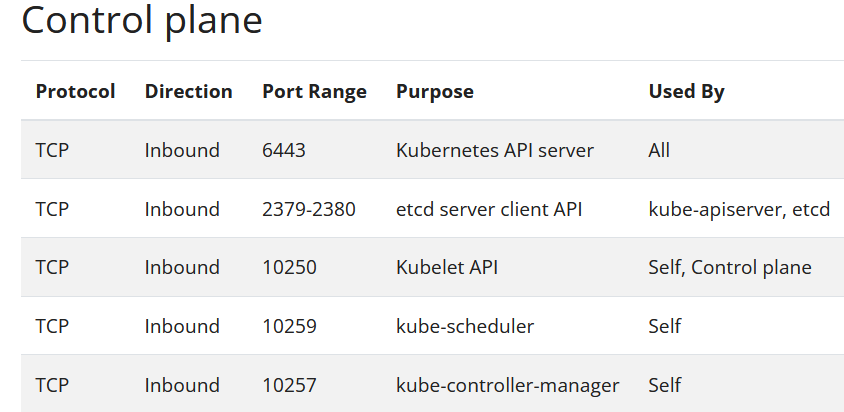
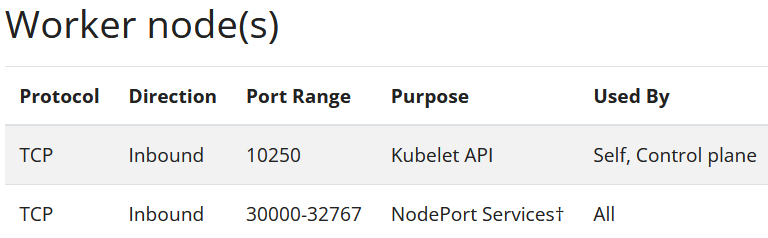
Verify Cluster Health (Control Plane)
kubectl version --client
kubectl config view --minify -o jsonpath='{.clusters[].name}'
kubectl get --raw='/readyz?verbose'
kubectl get pods -n kube-system
kubectl get nodes -o wide