If you run S3-compatible object storage on your own VMs or Kubernetes clusters, MinIO’s licensing and community edition changes probably put a few alternatives on your radar. RustFS is one of the practical options right now. It is written in Rust, released under Apache 2.0, and keeps the familiar :9000 API and :9001 console layout that most teams already script against.
Below is the setup I use to run RustFS behind Nginx on Docker, sanity-check it with mc and aws, and mirror buckets over from an existing MinIO cluster without taking workloads offline.
Need a MinIO test environment first? See the previous post: MinIO Object Storage with Docker & Nginx.
1. MinIO vs. RustFS: Practical Differences
| Aspect | MinIO | RustFS |
|---|---|---|
| Language & Runtime | Go (garbage-collected) | Rust (no GC pauses) |
| License | AGPLv3 | Apache License 2.0 |
| API | S3 REST API | S3 REST API |
| Ports | :9000 (API), :9001 (Console) |
:9000 (API), :9001 (Console) |
| CLI & SDKs | mc, aws CLI, S3 SDKs |
mc, aws CLI, S3 SDKs |
| Web Console | Built-in | Built-in |
Because the API contract and ports stay the same, most backup scripts, Velero targets, and application SDKs only need an endpoint and key swap.
2. Architecture
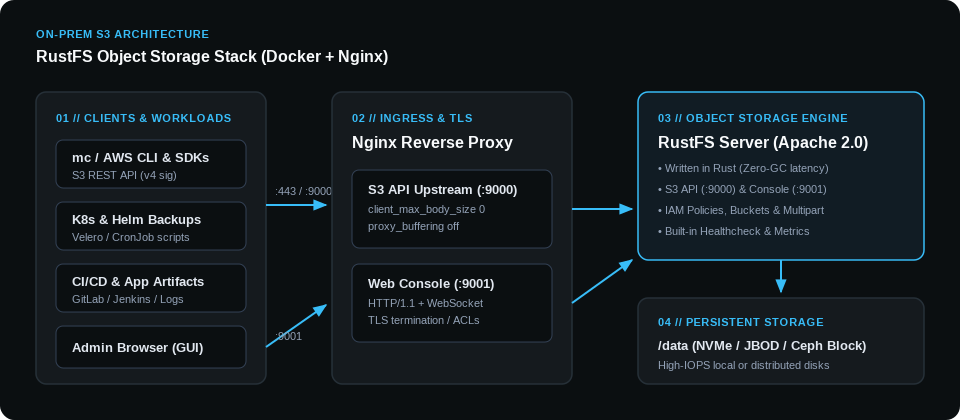
Putting Nginx in front of RustFS keeps TLS termination, access control, and large file uploads clean. One detail that trips people up on S3 proxies is buffering: if proxy_buffering and proxy_request_buffering stay on, multi-gigabyte uploads stall or fill /var/cache/nginx. Turning them off and setting client_max_body_size 0 lets streams pass straight through.
3. Deploying RustFS with Docker Compose & Nginx
Create the working directory and local storage path on the host:
sudo mkdir -p /opt/rustfs /data/rustfs
cd /opt/rustfs
Store Credentials in .env
Keep root keys out of docker-compose.yaml so you do not accidentally commit them to Git later. Put them in .env and lock file permissions:
RUSTFS_ACCESS_KEY=rustfs_prod_admin
RUSTFS_SECRET_KEY=ReplaceWithStrongRandomSecretKey.env
chmod 600 .envdocker-compose.yaml
Notice Nginx waits for service_healthy on the RustFS container instead of starting blindly on container boot:
services:
  rustfs:
    image: rustfs/rustfs:latest
    container_name: rustfs-server
    restart: unless-stopped
    env_file:
      - .env
    environment:
      RUSTFS_ADDRESS: "0.0.0.0:9000"
      RUSTFS_CONSOLE_ADDRESS: "0.0.0.0:9001"
      RUSTFS_CONSOLE_ENABLE: "true"
      RUSTFS_VOLUMES: "/data"
    volumes:
      - /data/rustfs:/data
    expose:
      - "9000"
      - "9001"
    healthcheck:
      test: ["CMD-SHELL", "curl -fsS http://127.0.0.1:9000/health || exit 1"]
      interval: 30s
      timeout: 10s
      retries: 3

  nginx:
    image: nginx:1.27-alpine
    container_name: rustfs-nginx
    restart: unless-stopped
    depends_on:
      rustfs:
        condition: service_healthy
    ports:
      - "9000:9000"
      - "9001:9001"
    volumes:
      - ./nginx.conf:/etc/nginx/nginx.conf:rodocker-compose.yaml
nginx.conf
Update server_name to match your internal or public DNS record:
user  nginx;
worker_processes  auto;

events {
    worker_connections  4096;
}

http {
    include       /etc/nginx/mime.types;
    default_type  application/octet-stream;
    sendfile      on;

    upstream rustfs_api {
        server rustfs:9000;
    }

    upstream rustfs_console {
        server rustfs:9001;
    }

    server {
        listen 9000;
        listen [::]:9000;
        server_name s3.devops.example.com;

        ignore_invalid_headers off;
        client_max_body_size 0;
        proxy_buffering off;
        proxy_request_buffering off;

        location / {
            proxy_set_header Host $http_host;
            proxy_set_header X-Real-IP $remote_addr;
            proxy_set_header X-Forwarded-For $proxy_add_x_forwarded_for;
            proxy_set_header X-Forwarded-Proto $scheme;

            proxy_connect_timeout 300;
            proxy_http_version 1.1;
            proxy_set_header Connection "";
            chunked_transfer_encoding off;

            proxy_pass http://rustfs_api;
        }
    }

    server {
        listen 9001;
        listen [::]:9001;
        server_name s3.devops.example.com;

        ignore_invalid_headers off;
        client_max_body_size 0;
        proxy_buffering off;
        proxy_request_buffering off;

        location / {
            proxy_set_header Host $http_host;
            proxy_set_header X-Real-IP $remote_addr;
            proxy_set_header X-Forwarded-For $proxy_add_x_forwarded_for;
            proxy_set_header X-Forwarded-Proto $scheme;

            proxy_http_version 1.1;
            proxy_set_header Upgrade $http_upgrade;
            proxy_set_header Connection "upgrade";
            chunked_transfer_encoding off;

            proxy_pass http://rustfs_console;
        }
    }
}nginx.conf
Start the Stack
docker compose up -d
docker compose ps
Once both containers report healthy, open http://<server-ip>:9001 and log in using the RUSTFS_ACCESS_KEY and RUSTFS_SECRET_KEY from .env.
4. Quick S3 Sanity Check (mc & AWS CLI)
Before touching production buckets, verify uploads and reads with both mc and aws:
mc alias set rustfs-dst http://<rustfs-ip>:9000 rustfs_prod_admin ReplaceWithStrongRandomSecretKey
mc mb rustfs-dst/smoke-test
echo "rustfs-ok" > check.txt
mc cp check.txt rustfs-dst/smoke-test/check.txt
mc ls rustfs-dst/smoke-test
mc cat rustfs-dst/smoke-test/check.txtAWS_ACCESS_KEY_ID=rustfs_prod_admin \
AWS_SECRET_ACCESS_KEY=ReplaceWithStrongRandomSecretKey \
aws --endpoint-url http://<rustfs-ip>:9000 s3 ls5. Moving Data from MinIO Without Downtime
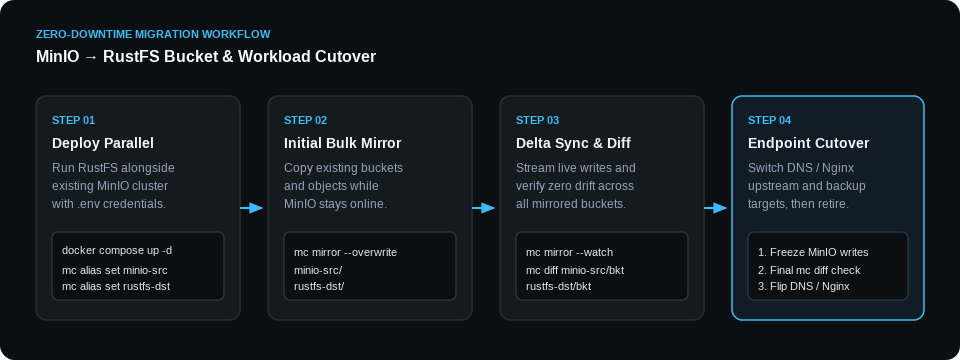
Standing up RustFS alongside MinIO is safer than doing an in-place swap. You copy the bulk data in the background, keep new writes synced, verify object counts, and then switch clients over.
Step 1: Add Both Aliases in mc
mc alias set minio-src  http://<minio-ip>:9000  <MINIO_ACCESS_KEY>  <MINIO_SECRET_KEY>
mc alias set rustfs-dst http://<rustfs-ip>:9000 <RUSTFS_ACCESS_KEY> <RUSTFS_SECRET_KEY>
Step 2: Run the Initial Mirror
You can mirror everything at once or start with a single critical bucket such as kubernetes from Helm Kubernetes Backup:
# All buckets
mc mirror --overwrite minio-src/ rustfs-dst/

# Single bucket
mc mb rustfs-dst/kubernetes
mc mirror --overwrite minio-src/kubernetes rustfs-dst/kubernetes
Step 3: Keep Writes Synced and Check for Drift
If services are still writing to MinIO while the copy runs, start a screen or tmux session and leave --watch running until your cutover window:
mc mirror --watch --overwrite minio-src/ rustfs-dst/Run mc diff to verify nothing was missed:
mc diff minio-src/kubernetes rustfs-dst/kubernetesNo output means every key and file size matches.
Step 4: Cut Over and Hold MinIO as a Safety Net
-
Stop or pause write jobs for a few seconds during the cutover window.
-
Run one last
mc mirrorandmc diffcheck so the final delta is synced. -
Update your backup cronjobs, Helm chart values, or DNS/Nginx upstream (
s3.devops.example.com) to point at RustFS:bash k8s_helm_backup.bash \ -d "BACKUP" \ -b "kubernetes" \ -h "http://<rustfs-ip>:9000" \ -a "<RUSTFS_ACCESS_KEY>" \ -s "<RUSTFS_SECRET_KEY>" \ -m true -
Leave the old MinIO cluster running in read-only mode (or watch its Nginx access logs) for 24 to 48 hours. If an old cronjob or forgotten script is still hitting MinIO, you will catch it in the logs before deleting the old volumes.
6. Things to Lock Down Before Production
- Put TLS in front of
:9000and:9001: Terminate HTTPS at Nginx or your load balancer instead of sending S3 signatures and keys over plain HTTP. - Skip root keys in pipelines: Create separate scoped keys per bucket or service rather than handing
RUSTFS_ACCESS_KEYto CI/CD runners or Velero. - Keep keys in Vault: Store production S3 credentials in HashiCorp Vault or sealed Kubernetes secrets instead of leaving
.envfiles around on app hosts. - Watch disk I/O: Keep
/data/rustfson dedicated NVMe or Ceph block volumes and track disk usage and latency alerts in Prometheus/Grafana.